


How to Add and Manage Employees in AltomateHR

Go to Company/Employee, then Manage Employee. This is everyone you pay, and everything payroll needs to know about them.
The employee list
- Search, and filter by role and
How to View Your Payslips and Form EA in AltomateHR
The Payslips tab lists your payslips once payroll for the month is finalised, with net pay, gross, EPF, SOCSO, EIS and PCB on each. It opens on your latest year.…
How to Use Altomate Payroll: Expert
On Expert, our payroll team prepares your payroll each month. You provide the information, approve each pay run in your Payroll Hub, and pay your staff through your bank.
What
…How to Complete Your Payroll Settings in AltomateHR
Go to Payroll, then Settings. There are four sections, each marked Completed, Required or Optional so you can see what’s left.
Until someone presses Save payroll settings…
How to Submit and Track Expense Claims in AltomateHR
Go to Claims and tap +, or tap Submit new claim on the Dashboard.
Submit a claim
- Who paid? Choose My own money (you’ll be reimbursed) or Company money
How to Use Altomate Payroll: DIY Paid
DIY Paid is for companies that run payroll themselves. You prepare payroll in AltomateHR, approve each pay run in your Payroll Hub, pay your staff through your bank, and submit …
How to Add Admins and Control What They Can See
Only owners can manage admins. Go to System Settings, then Admins. Owners are listed as Owner · full access; an owner’s access can’t be restricted.
Add an
…How to Apply for Leave in AltomateHR
Go to Leave, then My Leave. My Balances shows what you have left of each leave type, and History lists every request.
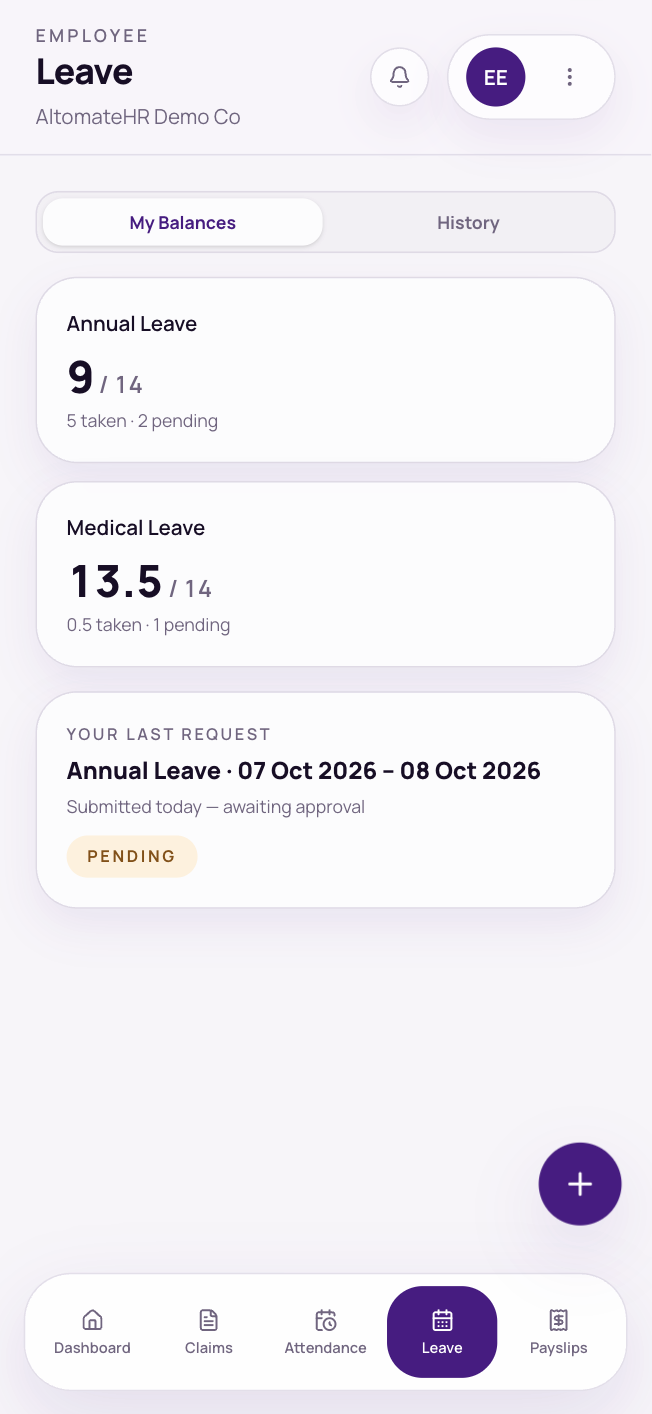
Apply for leave
…How to Use Altomate Payroll: DIY Free
DIY Free is for companies with up to 3 employees. You prepare payroll in AltomateHR, approve each pay run in your Payroll Hub, and pay your staff through your bank.…


